- Find your profile in the employee directory on the website.
- Scroll down to the bottom and click "log in" in the bottom right corner. Log in with Feide. Scroll down again - it should now say "manage document" in the bottom right corner.
- Click "manage document" to enter edit mode. Now you're ready! You can edit text and upload a picture.
- More details about different elements are provided below.
Basic information retrieved from other sources:
- Name (National Population Register). If you have changed your name in the National Register after being employed at UiA, you can send an email to lonn@uia.no to have it updated on your staff profile.
- Title (payroll and personnel system - DFØ): If you wish to change this, you must contact your line manager, who can request a change by contacting payroll: lonn@uia.no.
- Email and office phone (IT)
- Department (payroll and personnel system - DFØ)
- Mobile number (can be edited by the employee in DFØ)
- Office location (can be edited by the employee in DFØ)
More details about editing the staff profile:
Add/edit information
You have the following text boxes/titles (leave them empty if not relevant):
- Areas of responsibility
- Research
- Teaching
- Short biography
Write briefly and clearly, and remember to place information in the boxes where it belongs.
Don’t forget to save. Click either "save and view" or "save" (blue button).
Add/edit profile picture
To upload/change your picture:
- There are two versions of the image – a regular profile picture in a small format (minimum 300px * 300px) and a press photo (minimum 2MB). You can remove the press photo if you do not wish to use it. To remove it, delete the file name in this field.
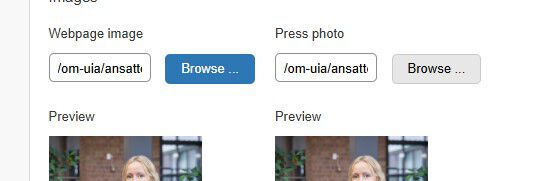
- Click "browse." This will take you to your folder, where you can click "upload file" and select the picture you want to use from your PC.
- Click "upload." Now the image is uploaded to your folder, and you click on the image file again to add it to your profile.
Profile picture guidelines:
- You are encouraged to have a picture on your UiA profile. With a picture, you help create a better impression of UiA, and it becomes more inviting for others to contact you.
- The face should be clearly recognisable, and you should be looking at the camera.
- The picture should have a professional character, not personal.
- The picture must meet satisfactory photographic quality (resolution, lighting, colours, sharpness, etc.).
- Employees are responsible for ensuring that the image meets these requirements.
Link to research groups, projects and Cristin publications
Make sure "yes" is checked for these fields for research groups and projects. This will automatically show an overview of groups and projects registered on UiA.no where your username is added to those groups/projects.
You can also enter the name and website of external groups and projects at other institutions/websites if relevant for you.
Publications from Cristin
Here, check that "yes" is selected for displaying publications in Cristin, if applicable. If not, select "no."
Is your employee profile not showing?
For your profile to be visible on uia.no, you must have an active employment relationship. Contact lonn@uia.no if you're unsure about this.