Log on
Log on to Fagpersonweb using FEIDE or ID-porten.
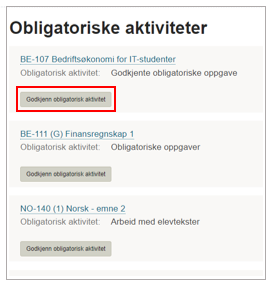
Choose <Approve compulsory assignments> in the top menu.
The full list containing assignments for your approval this semester will show.
Note: If your course takes place over two semesters, select <Term> in the menu on the right, and the first semester for the course will be visible in the list.
Choose the assignment you want to approve.
Registration
On the page for registration, please select students who has not fulfilled the compulsory assignment with <not approved>.
Afterwards you can approve the rest by choosing <Mark not-assessed for approval>
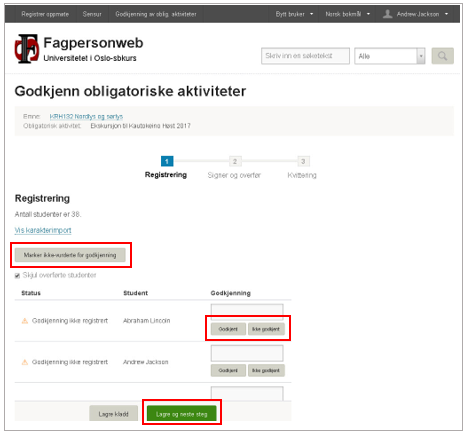
When you are finished, please choose <Save and next step>.
If the assignment has been approved earlier
If a student has passed the examination requirements for the course previously, a note stating exemption or previous approved assessment will be mentioned. In these cases, you do not need to fill in any results. Students who have already met the requirements will automatically be approved for the exam.
Save a draft
It is possible to safe a draft, using <Save draft>.
It is possible to transfer the approvals in several operations and groups.
Note that examination office will await the transfer of result to Studentweb until the result for all students is registered.
Sign and transfer
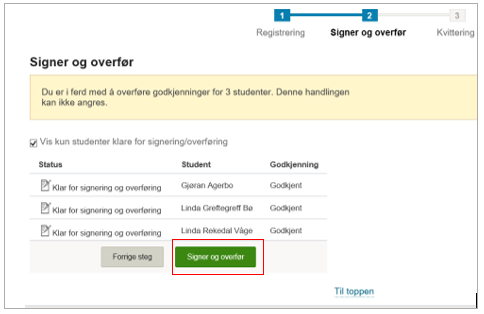
Choose <Sign and transfer> and the assessment will be digitally signed and the result will be made available.
Please let the examination office know that the registration is completed by sending an e-mail to eksamen@uia.no
Receipt
After signing and transferring, the result will show in the listing on the receipt page.
The list will show which candidates who are transferred and which candidates that are not yet assessed.
If the transfer has failed for some candidates, you will find an error message with explanation.